BlockPatternSelector
The BlockPatternSelector lets you select a block pattern from a list of available block patterns in a dropdown. In the dropdown, only patterns defined with Block Types including the provided blockType are listed.
See the Block Pattern API and Block Type Patterns for more information about block patterns.
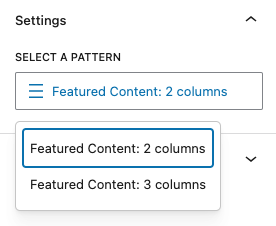
Example
In this example, all available patterns defined with a Block Type including t2/featured-content-layout are listed in the dropdown.
The first parameter of the onSelect callback contains the selected pattern name, the second parameter contains the full pattern object. Both can be undefined.
import { BlockPatternSelector } from '@t2/editor';
import { InspectorControls, useBlockProps } from '@wordpress/block-editor';
import { PanelBody } from '@wordpress/components';
import { __ } from '@wordpress/i18n';

export default function Edit({ attributes, setAttributes }) {
    const { patternName } = attributes;
    const blockProps = useBlockProps({ className: 't2-test-block' });

    return (
        <>
            <InspectorControls>
                <PanelBody title={__('Settings', 't2')}>
                    <BlockPatternSelector
                        blockType="t2/featured-content-layout"
                        value={patternName}
                        onSelect={(value, pattern) => setAttributes({ patternName: value })}
                        required
                    />
                </PanelBody>
            </InspectorControls>
            <div {...blockProps}>
                <p>{__('This is a test block.', 't2')}</p>
            </div>
        </>
    );
}BlockPatternSelector properties
export type BlockPatternSelectorProps = {
    /** The block type to fetch/select patterns for. */
    blockType: string;

    /** The control label. */
    label?: string;

    /** The selected dropdown menu item. */
    value?: string;

    /** An array of pattern values to exclude from the pattern dropdown. */
    exclude?: (string | number)[];

    /** An array of pattern values to include in the pattern dropdown. */
    include?: (string | number)[];

    /** Callback when a pattern is selected. */
    onSelect: (value: string | undefined, pattern: BlockPattern | undefined) => void;

    /** Whether a pattern is always returned (true) or not (false, default). */
    required?: boolean;
};BlockPattern properties
export type BlockPattern = {
    name: string;
    title: string;
    description: string;
    content: string;
    categories: string[];
    blockTypes: string[];
    blocks: unknown[];
};