MediaSuite wrapper
Convenient wrapper component for fast and easy media handling out-of-the-box.
For new media blocks, the convenient MediaSuite wrapper component is recommended for fast and easy media handling out-of-the-box. It's an integrated media viewer with built-in support for media placeholders, pickers, captions and embedded (streaming) media.
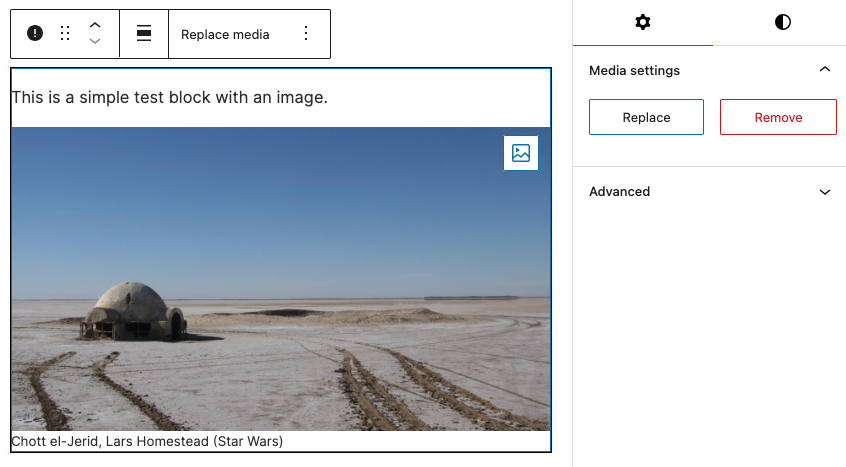
The MediaSuite wrapper is essentially a MediaSuiteViewer with integrated MediaSuitePlaceholder, MediaAndFocalPicker, MediaSuitePicker, MediaSuiteCaption, MediaSuitePanel and MediaEmbedViewer components.
Basic example
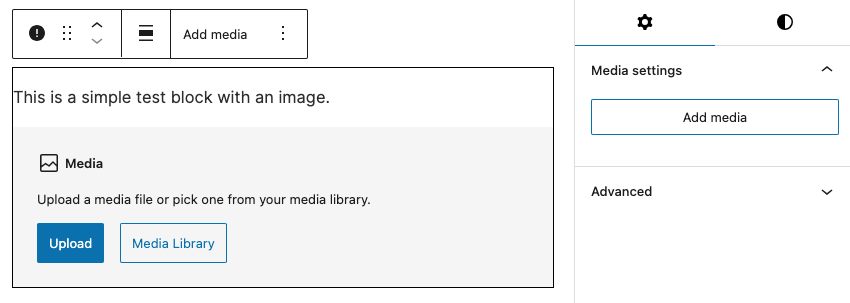

Even in its simplest form, the MediaSuite displays a media viewer with integrated placeholder, pickers and caption out-of-the-box.
import { MediaSuite } from '@t2/editor';
import { useBlockProps } from '@wordpress/block-editor';
import { __ } from '@wordpress/i18n';

export default function Edit({ attributes, setAttributes }) {
    // Block attributes for storing media data (use you own names as you please).
    const { mediaId, mediaUrl, mediaType } = attributes;
    const blockProps = useBlockProps({ className: 't2-test-block' });

    // Unified handler for updating media attributes.
    const updateMedia = (media) => {
        setAttributes({ mediaId: media.id, mediaUrl: media.url, mediaType: media.type });
    };

    return (
        <div {...blockProps}>
            <p>{__('This is a simple test block with an image.', 't2')}</p>
            <MediaSuite
                mediaId={mediaId}
                mediaUrl={mediaUrl}
                mediaType={mediaType}
                showMediaPickers={['toolbar', 'sidebar', 'block']}
                onSelectMedia={updateMedia}
                onResetMedia={updateMedia}
                onRemoveMedia={updateMedia}
            />
        </div>
    );
}Custom media controls

You can add custom media controls to the MediaSuitePanel. This will ensure that your custom controls are displayed in the same panel as the built-in media picker.
In this example, we add an ImageSizeSelector component to the media panel, allowing users to select the image size.
import { ImageSizeSelector, MediaSuite, MediaSuitePanel } from '@t2/editor';
import { useBlockProps } from '@wordpress/block-editor';
import { __ } from '@wordpress/i18n';

export default function Edit({ attributes, setAttributes }) {
    // Block attributes for storing media data (use you own names as you please).
    const { mediaId, mediaUrl, mediaType, mediaSize } = attributes;
    const blockProps = useBlockProps({ className: 't2-test-block' });

    // Unified handler for updating media attributes.
    const updateMedia = (media) => {
        setAttributes({ mediaId: media.id, mediaUrl: media.url, mediaType: media.type });
    };

    return (
        <>
            {mediaType === 'image' && (
                <MediaSuitePanel.Fill>
                    <ImageSizeSelector
                        value={mediaSize}
                        imageId={mediaId}
                        onChange={(slug, url) => setAttributes({ mediaSize: slug, mediaUrl: url })}
                    />
                </MediaSuitePanel.Fill>
            )}
            <div {...blockProps}>
                <p>{__('This is a simple test block with an image.', 't2')}</p>
                <MediaSuite
                    mediaId={mediaId}
                    mediaUrl={mediaUrl}
                    mediaType={mediaType}
                    mediaSize={mediaSize}
                    showMediaPickers={['toolbar', 'sidebar', 'block']}
                    onSelectMedia={updateMedia}
                    onResetMedia={updateMedia}
                    onRemoveMedia={updateMedia}
                />
            </div>
        </>
    );
}Enabling MediaSuite features
The enabled MediaSuite features depends on the event handlers you provide. None of the event handlers are required, but without them, MediaSuite will just behave like a simple media viewer.
Main feature requirements
onSelectMediais required for displaying any media placeholder or picker.onCaptionChangeis required for editing and toggling the caption.onEmbedChangeis required for embedded media.
Optional event handlers changing the visual appearance in the editor UI:
onFocalChange: Displays the FocalPointPicker and is called when the focal point changes.onToggleFeatured: Displays a menu item for using the post featured media.onSelectUrl: Displays a menu item for setting/changing a media url.onEmbedUrl: Displays a menu item for setting/changing an embedded media url.onResetMedia: Displays a Reset menu item when a media is selected.onRemoveMedia: Displays a Remove button when a media is selected.
Full example
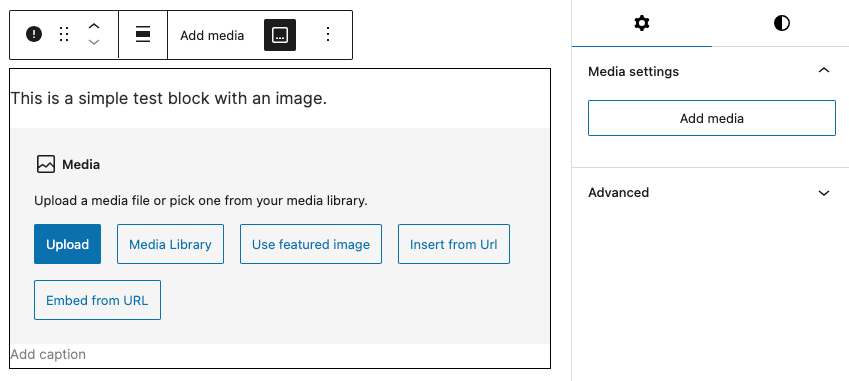

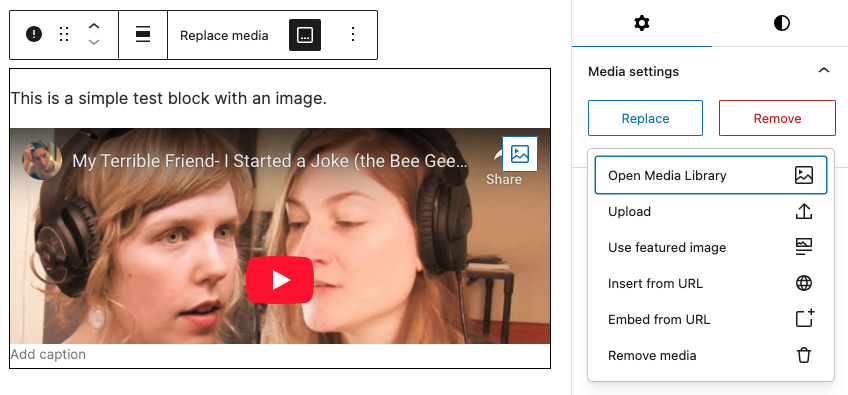
By adding event handlers and additional props, you can enable more features such as focal point picker, featured media support, caption and embedded media.
import { MediaSuite, useFeaturedMedia } from '@t2/editor';
import { useBlockProps } from '@wordpress/block-editor';
import { __ } from '@wordpress/i18n';

export default function Edit({ attributes, setAttributes }) {
    // Block attributes for storing media data (use you own names as you please).
    const { mediaId, mediaUrl, mediaType, focalPoint, useFeatured, caption, showCaption, embedMeta } = attributes;
    const blockProps = useBlockProps({ className: 't2-test-block' });

    // Unified handler for updating media attributes.
    const onUpdateMedia = (media) => {
        setAttributes({ mediaId: media.id, mediaUrl: media.url, mediaType: media.type });
    };

    /* This hook is required for post featured media support (onToggleFeatured) */
    useFeaturedMedia(useFeatured, mediaId, onUpdateMedia);

    return (
        <div {...blockProps}>
            <p>{__('This is a simple test block with an image.', 't2')}</p>
            <MediaSuite
                // Select which media pickers to display in the editor UI.
                showMediaPickers={['toolbar', 'sidebar', 'block']}

                // Media identifiers.
                mediaId={mediaId}
                mediaUrl={mediaUrl}
                mediaType={mediaType}

                // Media presentation.
                aspectRatio="5/2"
                objectFit="cover"
                focalPoint={focalPoint}
                useFeatured={useFeatured}

                // Event handlers for updating media attributes and enabling features.
                onFocalChange={(value) => setAttributes({ focalPoint: value })}
                onToggleFeatured={(value) => setAttributes({ useFeatured: value })}
                onSelectMedia={onUpdateMedia}
                onSelectUrl={onUpdateMedia}
                onRemoveMedia={onUpdateMedia}
                onResetMedia={onUpdateMedia}

                // Media caption properties.
                caption={caption}
                showMediaCaption={showCaption}
                onCaptionChange={(value, show) => setAttributes({ caption: value, showCaption: show })}

                // Embedded media properties.
                embedMeta={embedMeta}
                onEmbedUrl={onUpdateMedia}
                onEmbedChange={(meta) => setAttributes({ embedMeta: meta })}
            />
        </div>
    );
}Reference
The MediaSuite wrapper is built on top of the MediaSuiteViewer component and supports all of its props, in addition to the props listed in the Additional MediaSuite props section.
MediaSuiteViewer props
export type MediaSuiteViewerElement = HTMLElement | HTMLImageElement | HTMLPictureElement | HTMLVideoElement;
export type MediaSuiteViewerProps = Omit<HTMLProps<MediaSuiteViewerElement>, 'src' | 'children'> & {
    /** Media (attachment) ID. Optional if mediaUrl is provided. */
    mediaId: number | undefined;

    /** Media URL. Recommended for performance; optional if mediaId is provided. */
    mediaUrl: string | undefined;

    /** Media type (e.g., image, video). Improves performance but is optional. */
    mediaType: string | undefined;

    /** Media size slug (e.g., `thumbnail`, `medium`, `large`). */
    mediaSize?: string;

    /** Sets the aspect-ratio style of the media element. */
    aspectRatio?: CSSProperties['aspectRatio'];

    /** Sets the focal point of the media element. */
    focalPoint?: FocalPoint;

    /** Sets the object-fit style on the media element. */
    objectFit?: CSSProperties['objectFit'];

    /** Height style applied to the media element (not the HTML attribute). */
    heightStyle?: CSSProperties['height'];

    /** Width style applied to the media element (not the HTML attribute). */
    widthStyle?: CSSProperties['width'];

    /** Whether to wrap the media in a <figure> tag. */
    figureWrapper?: boolean;

    /** Custom props for the <figure> wrapper (applies when figureWrapper is true). */
    figureProps?: HTMLProps<HTMLElement>;

    /** Whether to wrap images in a <picture> tag. */
    pictureWrapper?: boolean;

    /** Custom props for the <picture> wrapper (applies when pictureWrapper is true). */
    pictureProps?: HTMLProps<HTMLPictureElement>;

    /** Callback to render a media placeholder when no media is defined. */
    renderMediaPlaceholder?: (props: MediaSuiteViewerProps, media?: unknown) => Element | undefined;

    /** Callback to render a media picker. */
    renderMediaPicker?: (props: MediaSuiteViewerProps, media?: unknown) => Element | undefined;

    /** Callback to render a caption below the media. */
    renderMediaCaption?: (props: MediaSuiteViewerProps, media?: unknown) => Element | undefined;

    /** Callback to render embedded media. */
    renderEmbeddedMedia?: (props: MediaSuiteViewerProps) => Element | undefined;

    /** Callback to render custom media formats. */
    renderCustomMedia?: (props: MediaSuiteViewerProps, media: unknown) => Element | undefined;
};Additional MediaSuite props
export type MediaSuiteProps = MediaSuiteViewerProps & {
	/** Comma-delimited list of MIME types accepted for upload, i.e `image/jpeg, video/mp4`. */
	accept?: MediaReplaceFlowProps['accept'];

	/** An array of media types allowed to replace the current media, i.e. `image`, `video`. */
	allowedTypes?: MediaReplaceFlowProps['allowedTypes'];

	/** The media cation. */
	caption?: string;

	/** Whether to use the post featured media (true) or not (false). */
	useFeatured?: MediaReplaceFlowProps['useFeaturedImage'];

	/** Embedded media metadata. */
	embedMeta?: MediaEmbedViewerProps['embedMeta'];

	/** Displays a media picker in the toolbar, sidebar and/or block. */
	showMediaPickers?: ('toolbar' | 'sidebar' | 'block')[];

	/** Whether to show the media caption (true) or not (false). */
	showMediaCaption?: MediaSuiteCaptionProps['showMediaCaption'];

	/** Whether to show the media caption toggle in the toolbar (true) or not (false). */
	showCaptionToggle?: MediaSuiteCaptionProps['showCaptionToggle'];

	/** Callbacks for enabling and handling features. */
	onFocalChange?: MediaAndFocalPickerProps['onFocalChange'];
	onToggleFeatured?: MediaSuitePickerProps['onToggleFeatured'];
	onCaptionChange?: MediaSuiteCaptionProps['onCaptionChange'];
	onSelectMedia?: UpdateMediaHandler;
	onSelectUrl?: BasicMediaHandler;
	onEmbedUrl?: BasicMediaHandler;
	onEmbedChange?: MediaEmbedViewerProps['onEmbedChange'];
	onRemoveMedia?: BasicMediaHandler;
	onResetMedia?: BasicMediaHandler;
};